The media downloader that stays out of your way
Paste a link, preview what's there, and save it as video or audio. Free and open source, for Windows, macOS, and Linux.
MIT licensed. No accounts, no ads, no telemetry. All downloads
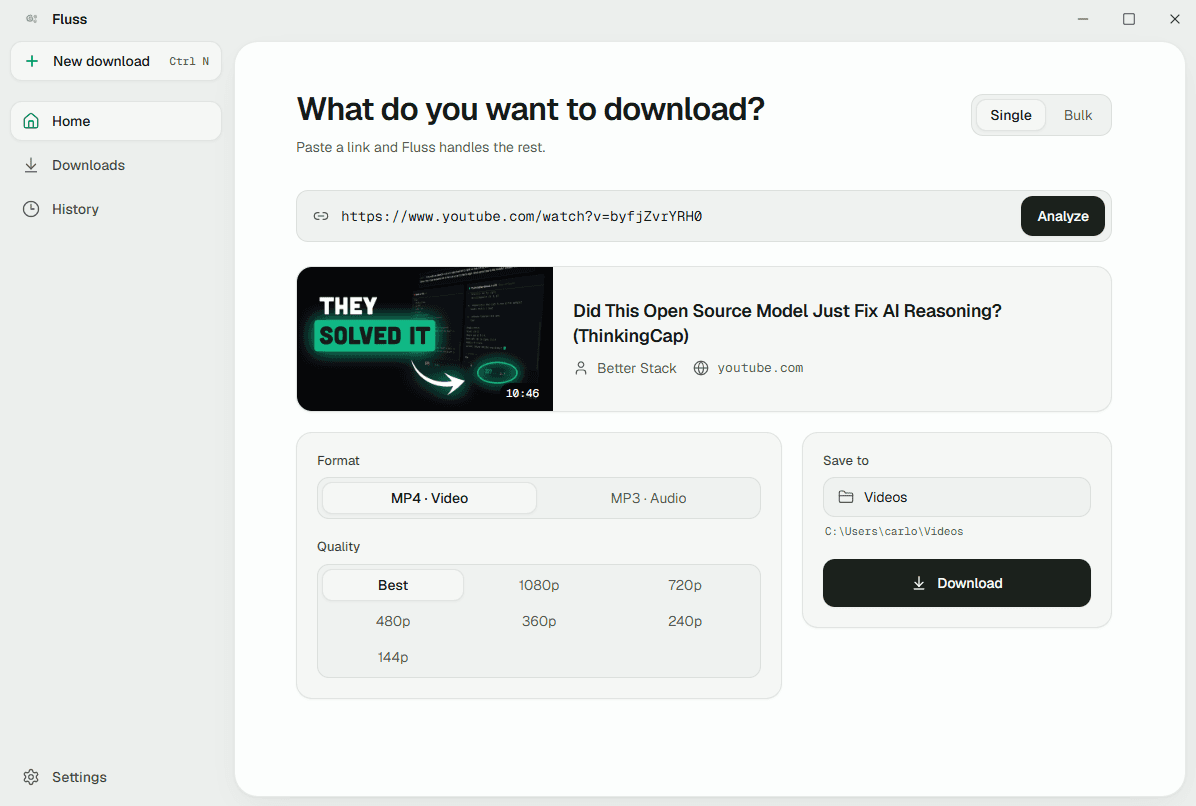
What it looks like
Four screens, and that's the whole app. No dashboard, no onboarding, no upsell.
What it does
A media URL in, a file on disk out. Everything here exists to make that one path unambiguous.
URL analysis
Paste a link and instantly see the title, thumbnail, and duration — before you commit to anything.
MP4 or MP3
Download as video or audio, at any quality up to the source maximum.
Live progress
Speed, file size, and ETA while it runs. Cancel at any point.
Bulk & queue
Paste one link or several — single mode shows a preview, bulk mode builds a list. They auto-advance one at a time so nothing thrashes your connection.
Persistent history
Every download stays listed — open it, reveal it in its folder, grab it again, or remove it.
Desktop notifications
Real OS notifications when a download finishes or fails, so you can leave it running.
Under the hood
The parts you only notice when they're missing.
Bundled yt-dlp and FFmpeg
Both engines ship inside the app. Nothing to install, nothing to put on your PATH, nothing to keep in sync.
Self-updating
Checks for updates on launch, then installs and restarts itself.
Errors written for humans
Plain-language explanations up front, with the raw output tucked behind a reveal for when you want it.
Browser cookie passthrough
When a site blocks the download, flip one toggle and Fluss borrows your real browser session — no cookie files to manage, no config to write.
Tauri 2 and a Rust core
A Rust backend with a React 19 front end — a fraction of the footprint of an equivalent Electron build.
How it works
Three steps, and the third one is waiting.
Paste
Copy a media URL and paste it in. Fluss analyzes it on the spot — no search, no browsing.
Preview and pick quality
Check the title, thumbnail, and duration, then choose MP4 or MP3 and the quality you want.
Download
Watch it run, then find the file in your download folder — and in history, permanently.
Where it works
Fluss runs on yt-dlp, which ships extractors for roughly 1,700 sites. These are the ones people actually paste.
Video and social
- YouTube
- TikTok
- X (Twitter)
- Twitch
- Kick
- Vimeo
- Dailymotion
- Rumble
- Bluesky
- Bilibili
- Niconico
Audio
- SoundCloud
- Bandcamp
- Mixcloud
Elsewhere
- BBC iPlayer
- TED
- Tumblr
- Patreon
Not all of them, all of the time — sites change and extractors break, then get fixed. The only reliable test is to paste the link. The full list lives in yt-dlp's supported sites.
Why Fluss?
Other tools exist. Here's how Fluss compares on the things that actually matter.
- Yes
No setup required
Also in 4K Video Downloader, Stacher
- Yes
Open source & free
Also in yt-dlp (CLI)
- Yes
GUI interface
Also in 4K Video Downloader, Stacher
- Yes
Cross-platform
Also in yt-dlp (CLI), 4K Video Downloader, Stacher
- Yes
Self-updating
Also in Stacher
- Yes
Bulk download queue
Also in 4K Video Downloader
- Yes
Persistent history
Also in 4K Video Downloader
| Feature | Fluss | yt-dlp (CLI) | 4K Video Downloader | Stacher |
|---|---|---|---|---|
| No setup required | Yes | No | Yes | Yes |
| Open source & free | Yes | Yes | No | No |
| GUI interface | Yes | No | Yes | Yes |
| Cross-platform | Yes | Yes | Yes | Yes |
| Self-updating | Yes | No | No | Yes |
| Bulk download queue | Yes | No | Yes | No |
| Persistent history | Yes | No | Yes | No |
Download
Version v0.11.2, released . Release notes.
macOS
Apple Silicon, aarch64
Disk image102 MBUnsigned build — right-click → Open on first launch, or run xattr -cr /Applications/Fluss.app.
Linux
Any modern distribution
Portable152 MBMake the AppImage executable first: chmod +x Fluss*.AppImage.
Versions before v0.3.1 shipped without an updater, so that one upgrade is manual. Everything after v0.3.1 updates itself.
Questions
Is it free?
Yes — MIT licensed and open source. No accounts, no ads, no telemetry, no paid tier.
What if a site blocks the download?
Turn on "Use my browser sign-in" in Settings. Fluss borrows your real browser session cookies so the site sees a signed-in human. On Windows it uses Firefox; on macOS and Linux it uses Chrome — no configuration needed.
Does it work offline?
The app needs no server of its own, but fetching media obviously needs a connection. Your history stays readable offline.
Which sites does it support?
Whatever yt-dlp supports — roughly 1,700 sites and counting. The popular ones are listed above; if yt-dlp can read it, so can Fluss.
Why does Windows warn me about the installer?
The build isn't code-signed, so SmartScreen flags it as unrecognized. Click More info → Run anyway. macOS is the same story: right-click → Open on first launch.
Where do downloads go?
Your system download folder by default. Change it in Settings — the choice persists.